How Does Read Aloud Work?
When a participant opens an activity in Wittario Play online, the Read Aloud button appears on text content that can be read aloud.
To use the feature:
- The participant clicks Read Aloud.
- The text is read automatically.
- No audio recording is required in advance.
The person creating the activity does not need to upload or record any audio files.
What Language Is Used for Read Aloud?
Read Aloud uses the language selected for the activity.
For example:
- If the activity language is set to Norwegian, the text will be read in Norwegian.
- If no language is selected for the activity, the participant’s own language will be used instead.
Selecting the correct activity language is therefore important to ensure more accurate pronunciation and a better listening experience.
How Do I Choose the Language for an Activity?
Before publishing an activity, we recommend checking that the correct language has been selected.
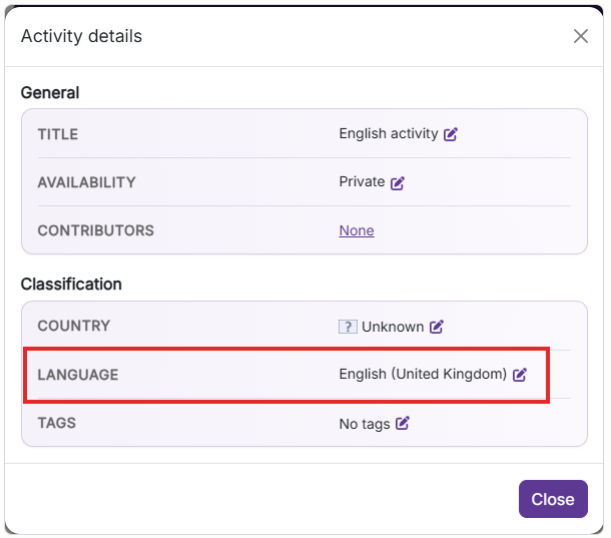
To set the activity language:
- Open the activity in Wittario.
- Go to Activity Details.
- Find the Classification section.
- Locate the Language field.
- Click the edit icon.
- Select the language in which the activity content is written.
Why Should I Set a Language for the Activity?
When a language is selected for the activity, Read Aloud knows which language to use when reading the text.
This helps provide:
- More accurate pronunciation
- A more natural listening experience
- Better consistency for all participants
If the language field is left empty, Read Aloud will instead use the participant’s own language.
Who Can Benefit from Read Aloud?
Read Aloud can make Wittario activities easier to follow for a wide range of participants, including:
- Children and young people
- People learning a new language
- Participants with reading difficulties
- Participants with visual challenges
- People who learn better by combining audio and text
The feature can also be useful when activities take place outdoors or in situations where reading a large amount of text on a screen is less practical.
Frequently Asked QuestionsCan Participants Listen to Tasks in Wittario?
Yes. In Wittario Play online, participants can use the Read Aloud button to have tasks, instructions, and other text content read aloud.
Do I Need to Record Audio for the Activities?
No. Read Aloud generates the reading automatically.
You do not need to:
- Record audio
- Upload audio files
- Prepare voice recordings in advance
How Does Wittario Determine Which Language the Text Should Be Read In?
Wittario first uses the language selected for the activity.
If no language has been selected, the participant’s own language is used instead.
What Happens If I Do Not Select a Language for the Activity?
If the activity does not have a defined language, Read Aloud will use the participant’s own language.
For the best possible reading experience, we recommend selecting the correct language under:
Activity Details → Classification → Language
Where Can I Find the Language Setting?
You can find the language setting here:
Activity Details → Classification → Language
Does Read Aloud Work in Wittario Play in the Browser?
Yes. Read Aloud is available in Wittario Play online, allowing participants to listen to text content while completing an activity.
Can Read Aloud Make Wittario More Accessible?
Yes. Combining text and audio can make activities easier to follow for more participants.
It also gives participants greater flexibility in how they access and consume learning content.